Points & Rewards
Build a points economy that motivates your family. Kids earn points for completing chores and redeem them for rewards you create.
Last updated: March 2026
How Points Work
Points are the currency of HousePoints. Children earn points by completing chores and spend them on rewards. The system creates natural motivation without constant reminders.
The Points Cycle
- Earn - Complete chores, receive bonus points, or get awarded points by parents.
- Save - Accumulate points toward bigger rewards.
- Spend - Redeem points for rewards from the family reward shop.
- Repeat - Motivation to earn more points continues the cycle.
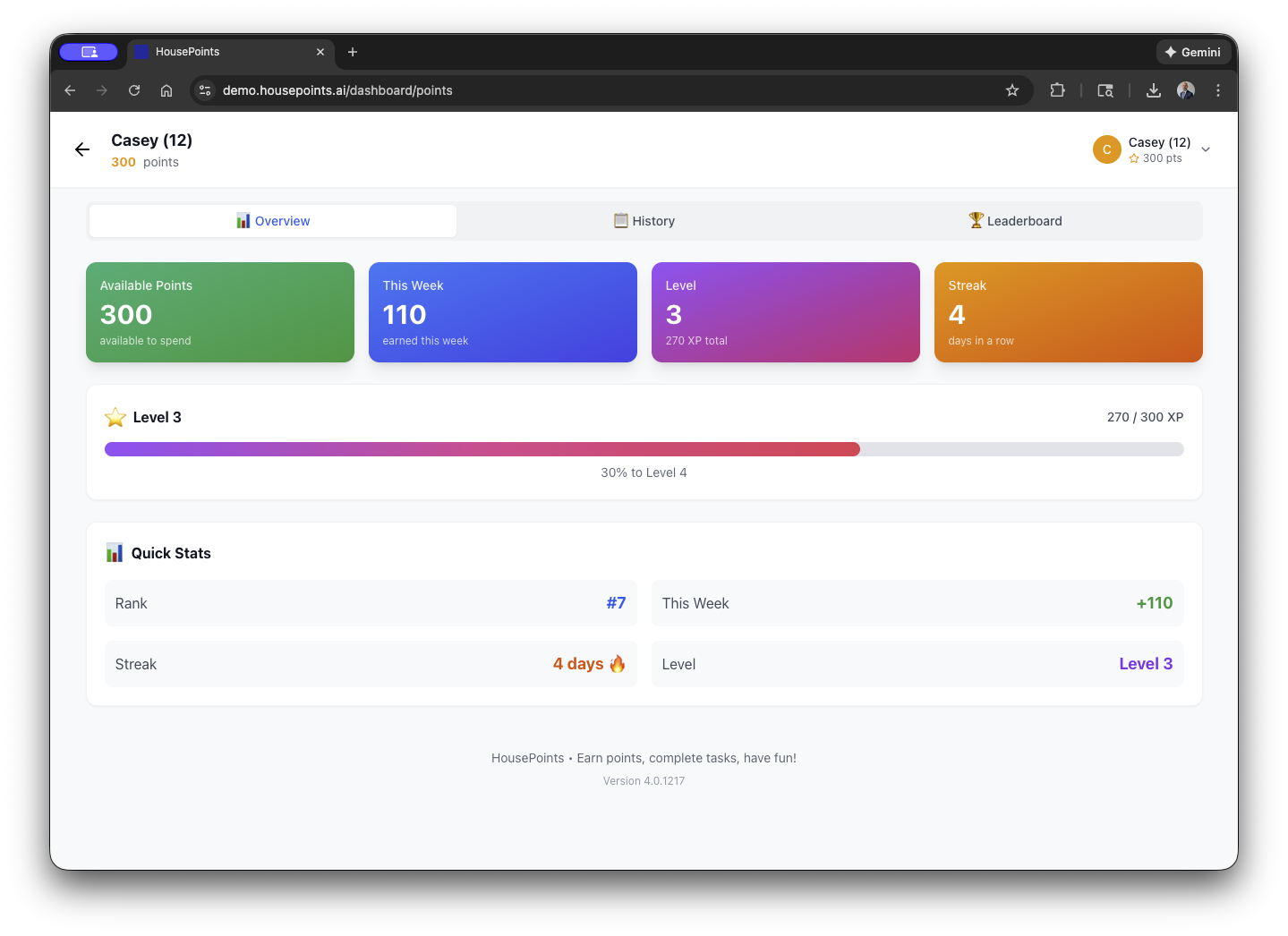
Point Balances
Each child has their own point balance that tracks:
- Current Balance - Points available to spend.
- Total Earned - All-time points earned (for stats and achievements).
- This Week - Points earned in the current week.
Earning Points
There are several ways for children to earn points in HousePoints.
Completing Chores
The primary way to earn points. When a child completes a chore (and it's verified if required), the point value is added to their balance.
Bonus Points from Parents
Parents can award bonus points anytime:
- Click the + or Add Points button.
- Select the child.
- Enter the point amount.
- Add an optional note explaining the bonus.
- Click Add.
Use bonus points for:
- Going above and beyond
- Good behavior
- Helping without being asked
- Academic achievements
- Special accomplishments
Streak Bonuses
Children earn streak bonuses for completing all assigned chores on consecutive days. Streaks encourage consistency.
- 3-day streak - 10 bonus points
- 7-day streak - 25 bonus points
- 14-day streak - 50 bonus points
- 30-day streak - 100 bonus points
Streak bonuses can be customized or disabled in settings.
Creating Rewards
Rewards are what kids work toward. Create rewards that motivate your specific children.
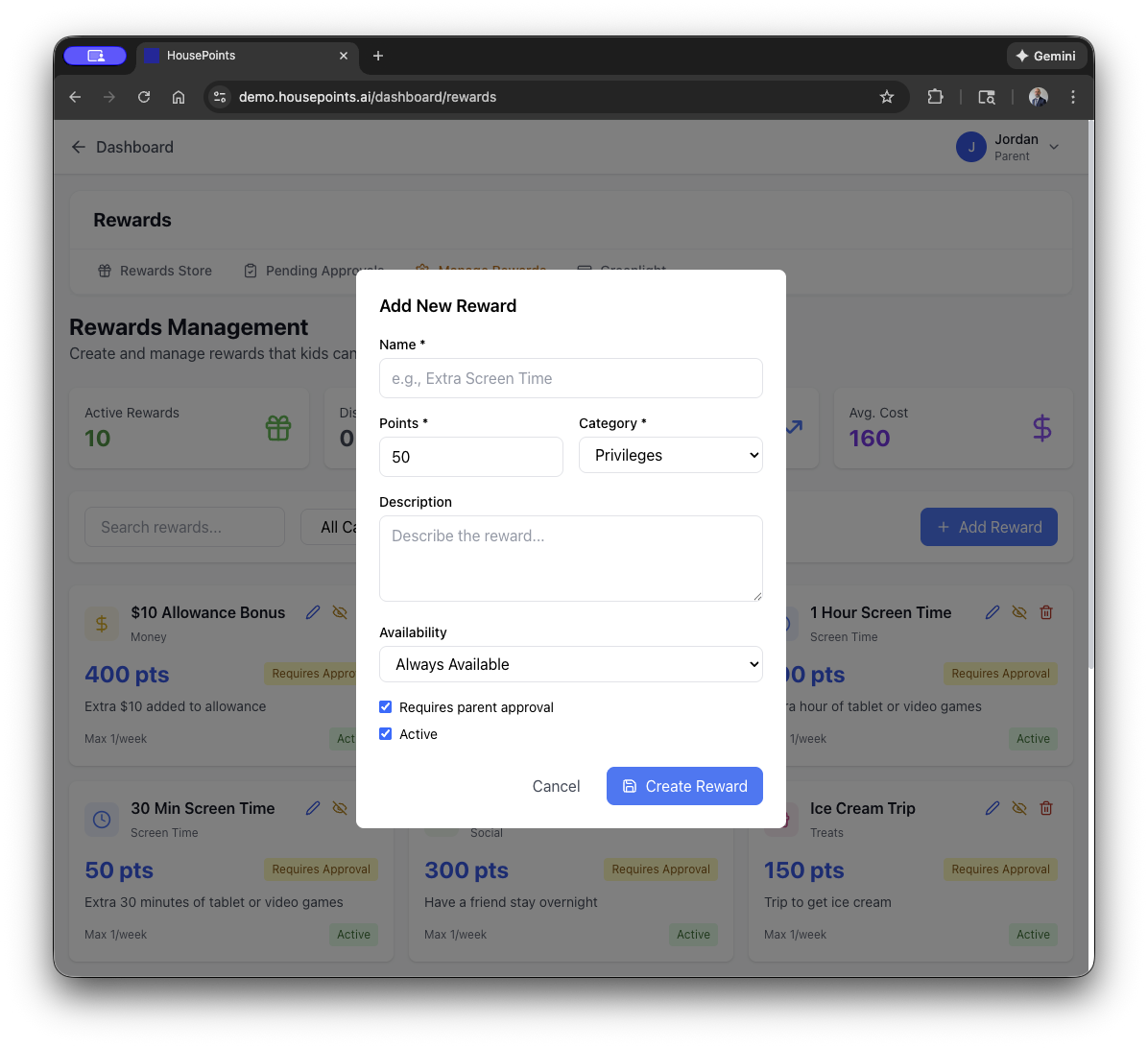
How to Create a Reward
- Go to Rewards in the navigation.
- Click Add Reward.
- Enter reward details:
- Name - What the reward is (e.g., "30 minutes screen time").
- Description - Optional details.
- Point Cost - How many points to redeem.
- Image - Optional photo or icon.
- Click Save.
Reward Ideas
Here are popular rewards that work well for families:
Screen Time
- 30 minutes of video games (50 points)
- Extra TV time (40 points)
- Movie night pick (100 points)
Activities
- Trip to the park (75 points)
- Sleepover with friend (200 points)
- Choose dinner restaurant (150 points)
Treats
- Ice cream (40 points)
- Candy or snack (25 points)
- Baking cookies together (80 points)
Money & Items
- $1 allowance bonus (100 points)
- Small toy from store (300 points)
- Book of choice (200 points)
Privileges
- Stay up 30 minutes late (60 points)
- Skip one chore (varies)
- Choose family activity (150 points)
Reward Availability
You can control when rewards are available:
- Always Available - Can be redeemed anytime.
- Limited Quantity - Only X redemptions available.
- Specific Days - Only available on certain days (e.g., weekends only).
- Hidden - Not visible in the shop but can be awarded by parents.
Redeeming Rewards
Children browse the reward shop and request rewards they've saved enough points for.
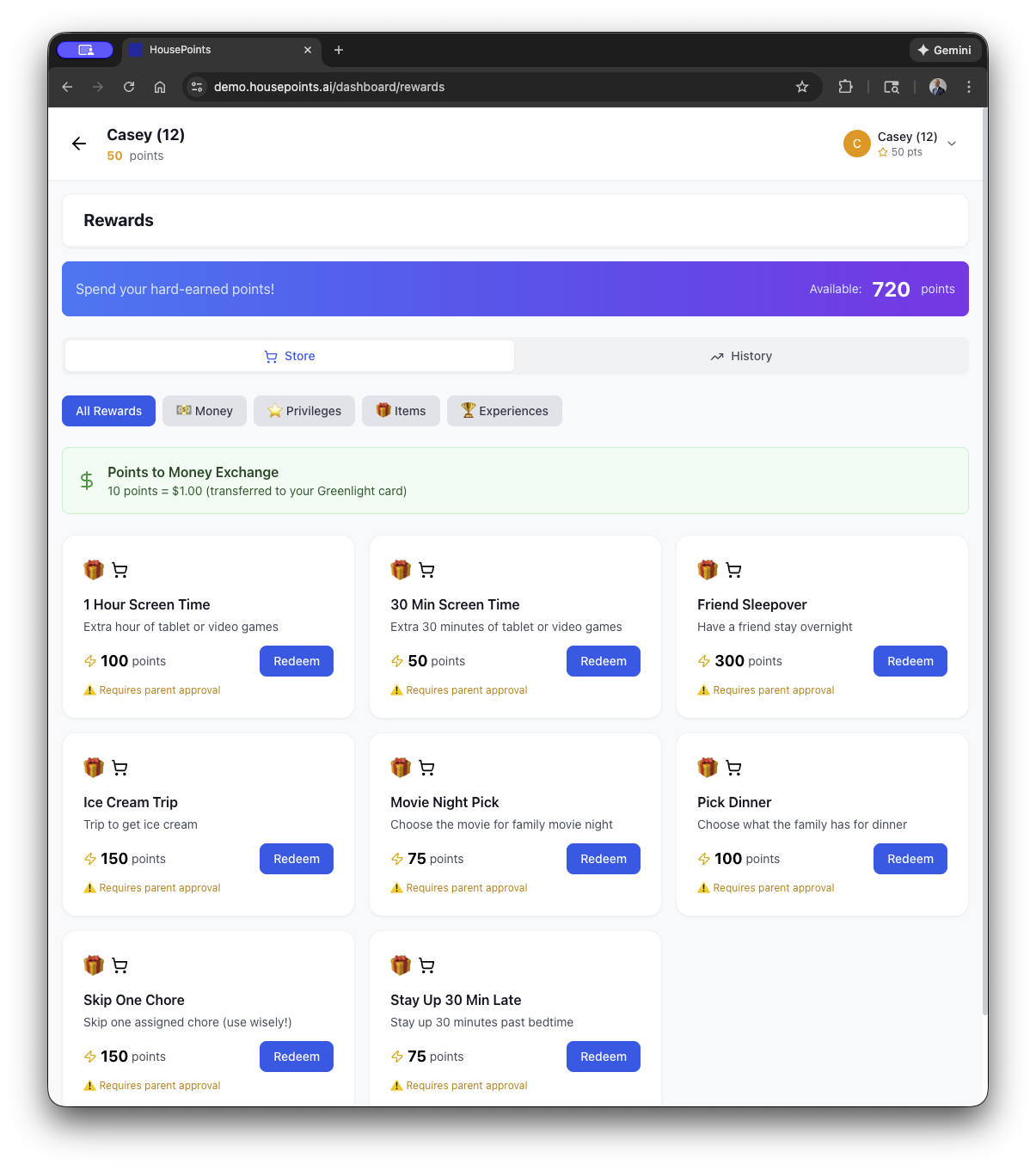
How Children Redeem
- Open the Rewards or Shop section.
- Browse available rewards and their point costs.
- Select a reward they can afford (have enough points).
- Click Redeem.
- Confirm the redemption.
Redemption Approval
You can configure whether redemptions require approval:
- Instant Redemption - Points deducted immediately, no approval needed.
- Requires Approval - Request goes to parents who approve or deny.
To approve a redemption request:
- Open Pending Redemptions (in rewards section or notifications).
- Review the request.
- Click Approve to deduct points and grant the reward.
- Or click Deny to reject (points not deducted).
Deductions
Parents can apply point deductions for behavior issues or unmet responsibilities. Deductions are a teaching tool, not a punishment, and help children understand consequences.
Applying a Deduction
- Go to a child's profile or the Deductions section in Settings.
- Select the child and choose a reason (or enter a custom one).
- Enter the point amount to deduct.
- Add a note explaining why (visible to the child).
- Click Apply.
Common Deduction Categories
- Leaving dishes out
- Not taking out trash
- Leaving supplies/materials out
- Room cleanliness
- Behavior issues
Reversing a Deduction
Made a mistake? Deductions can be reversed, which restores the points to the child's balance. The child must acknowledge the deduction before it can be reversed.
Bonuses and Streaks
Beyond regular chore points, HousePoints includes bonus systems to encourage consistency and extra effort.
Daily Streak
A streak counts consecutive days where a child completes ALL their assigned chores. Missing even one chore resets the streak to zero.
Streaks display prominently in the child's view and on the leaderboard.
Customizing Streak Bonuses
- Go to Settings > Points & Rewards.
- Find the Streak Bonuses section.
- Adjust point values for each milestone.
- Or disable streak bonuses entirely.
Weekly Bonus
Optionally award bonus points for completing a certain percentage of chores each week:
- 100% completion - Full bonus (e.g., 50 points)
- 90%+ completion - Partial bonus (e.g., 25 points)
- Below 90% - No bonus
Chore Marketplace
The chore marketplace lets children trade and bid on chores. This teaches negotiation and gives kids more control over their workload.
Chore Trading
Children can trade assigned chores with siblings. One child offers a trade, and the other can accept or decline. Both children must agree for the trade to go through.
Open Chore Bidding
Unassigned chores can be posted to the marketplace where children bid for them. The lowest bid wins, encouraging kids to compete for work. Parents set how long bids stay open before closing.
How It Works
- A parent posts an unassigned chore to the marketplace.
- Children submit bids with their desired point amount.
- After the bidding window closes, the lowest bid wins the chore.
- The winning child completes the chore and earns the bid amount.
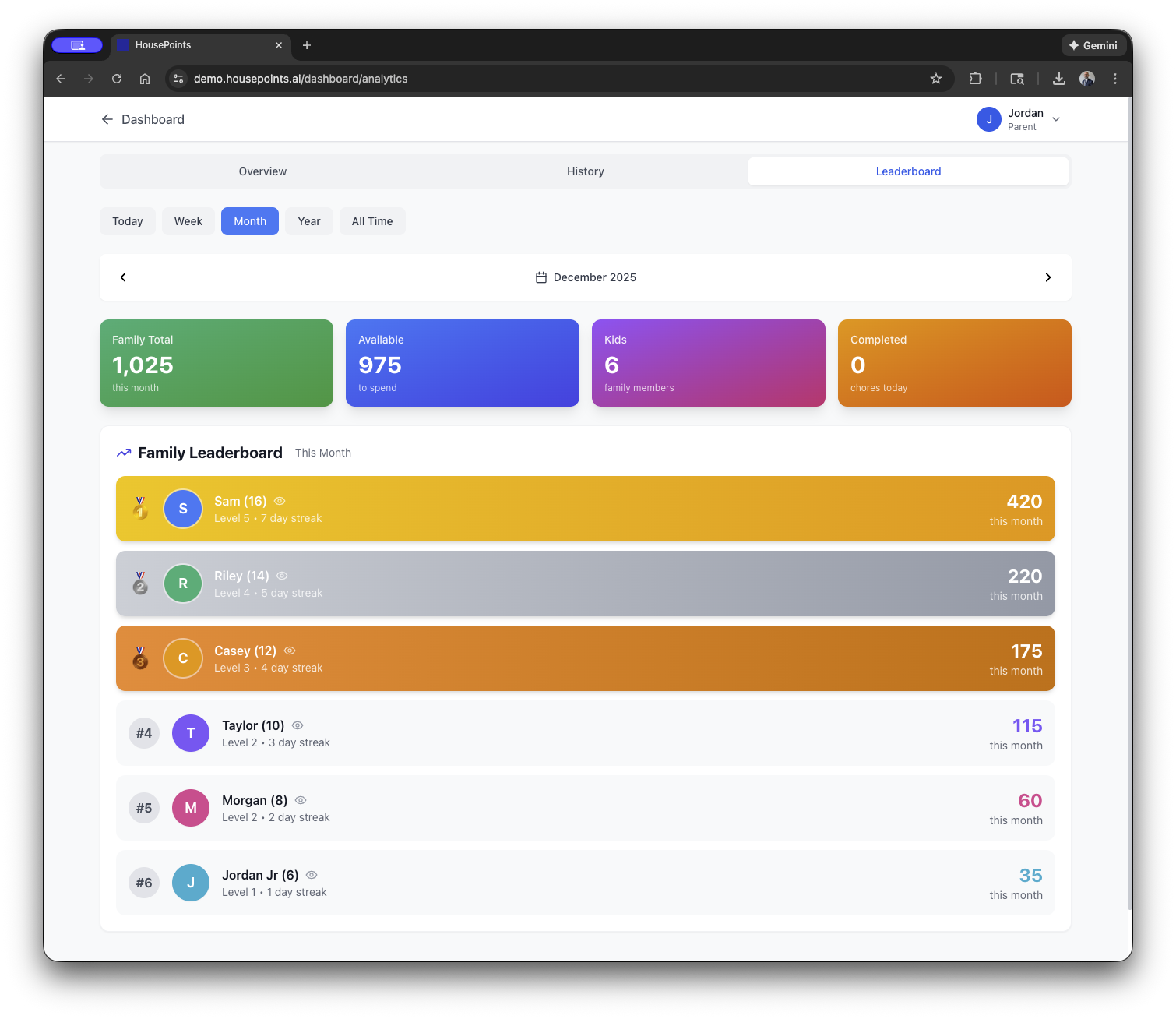
Leaderboard
The leaderboard shows point standings for all children. Friendly competition motivates kids to earn more points.
What the Leaderboard Shows
- Current Week Points - Who's winning this week.
- Current Streaks - Who has the longest streak.
- Total Points - All-time point leaders.
- Chores Completed - Total chores done (optional view).
Leaderboard Settings
The leaderboard can be customized:
- Show/Hide Points - Choose whether to display actual point numbers or just rankings.
- Reset Weekly - Leaderboard resets each week for fresh competition.
- Disable - Turn off the leaderboard if competition isn't right for your family.
Leaderboard Display
The leaderboard appears on the family dashboard, kiosk displays, and in each child's view. It updates in real-time as points are earned.
Point Economy Tips
- Start with lower point values. You can always increase, but decreasing feels like punishment.
- Price rewards relative to effort. A day's worth of chores should buy a small reward.
- Include rewards at various price points so kids can get quick wins or save up.
- Review and adjust periodically as your family's needs change.